
 Choosing fundraising software can feel harder than it should when you’re running a small nonprofit.
You need something affordable, easy to set up, and simple enough for your team to use without technical help.
But you also do not want to choose a tool you will outgrow the moment your fundraising starts to pick up.
That’s why we wrote this guide to help you.
In it, we compare 7 fundraising platforms built for different types of small nonprofits, looking at features, pricing, ease of use, and where each one fits best.
How the right fundraising software can cater to a small nonprofit’s needs
For a small nonprofit, the best fundraising software should make it easier to raise money without adding more admin work.
That usually comes down to a few things:
- Low cost to get started: Many small nonprofits work with tight budgets (usually below $50,000), so a free or low-cost entry point can matter more than a long list of advanced features.
- Fast setup: Your team should be able to launch donation forms, campaigns, and basic workflows without waiting on a developer or outside consultant.
- Easy day-to-day use: If only one or two people are managing fundraising, the platform should be simple enough to use without constant training.
- Useful tools in one place: Donation forms, donor records, email, and reporting are easier to manage when they work together instead of across several separate systems.
- Room to grow: As your nonprofit adds recurring giving, events, peer-to-peer campaigns, or deeper donor management, the software should be able to grow with you.
The 7 Best Fundraising Software for Small Nonprofits
Small nonprofits do not all fundraise the same way. Some need a simple donation form, while others are already running events, peer-to-peer campaigns, email appeals, and recurring giving.
The tools below cover that range, starting with the platform that gives small teams the broadest set of fundraising tools without a required software subscription.
1. Givebutter
Best for: Small nonprofits that want fundraising, events, donor management, and supporter communication in one platform.
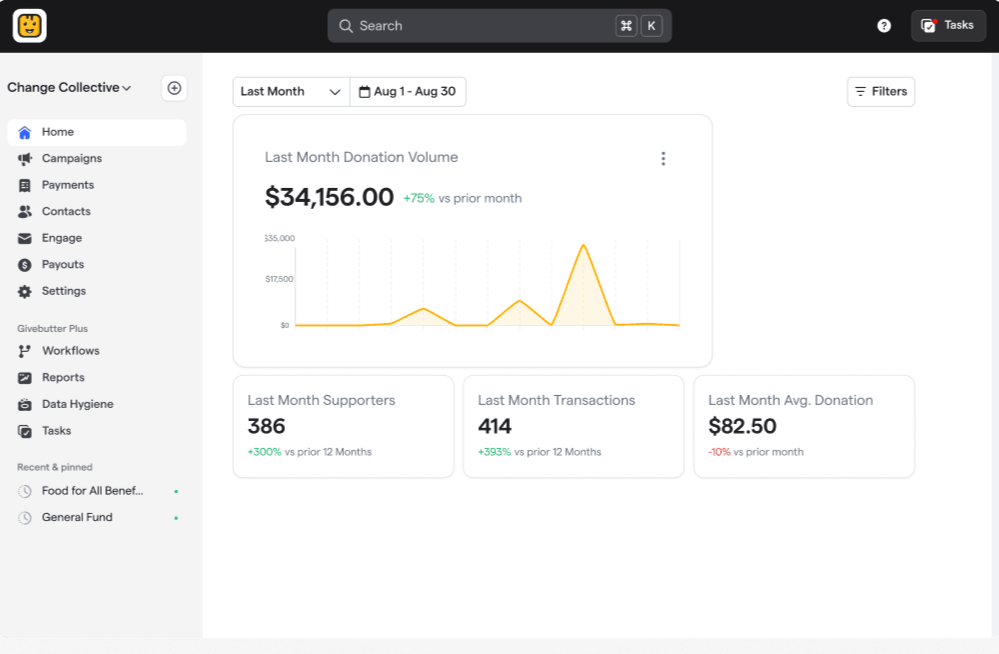
Givebutter brings several tools a small nonprofit may otherwise buy separately into one system. Teams can collect donations, run campaigns and events, manage donors, host auctions, and send emails without moving data between different platforms.
That makes it useful for smaller teams that want to keep their fundraising setup simple.
You can launch a campaign without a developer, then use the same platform to track the people who gave and continue communicating with them.
Key features
- Donation forms: Create branded forms for one-time and recurring gifts.
- Fundraising pages: Build campaign pages for individual, team, and peer-to-peer fundraising.
- Events & ticketing: Sell tickets and manage virtual, in-person, or hybrid events.
- Auctions: Run silent auctions alongside your other fundraising activity.
- Nonprofit CRM: Keep donor profiles, giving history, activity, and reports in the same platform.
- Email marketing: Send email blasts to supporters without moving your donor list to another tool.
Reviewer feedback also supports the small-team fit. As of September 2026, Givebutter holds 4.7/5 across 2,211 G2 reviews, where reviewers often mention easy setup and simple fundraising management. Capterra gives it 4.8/5 across 872 reviews, with ease of use rated 4.7/5.
Devin J., an advancement coordinator, highlighted its ease of use, range of features, support, and low cost for a smaller team.
Pricing
Givebutter’s core fundraising tools are free to use. Under the Givebutter Guarantee, nonprofits pay $0 in platform and processing fees when optional donor tips are enabled, even if a donor chooses not to leave a tip.
If tips are turned off, Givebutter charges a 3% platform fee, plus standard processing fees of 2.9% + $0.30 for cards or 1.9% + $0.30 for ACH. Advanced Givebutter Plus features are available separately.
2. Little Green Light
Best for: Lean nonprofit teams that want affordable donor management, reporting, and gift tracking without a more complex fundraising system.
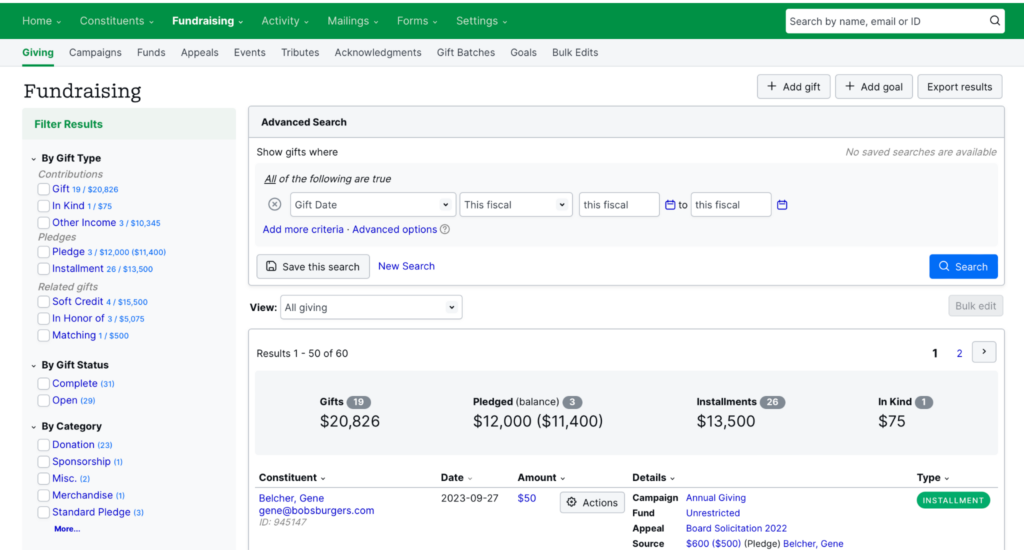
Little Green Light is a cloud-based donor management and fundraising CRM. You have donor records, gifts, tasks, reports, memberships, volunteer data, and online donations into one system.
Every account gets the same feature set, so you don’t need to move up a tier to unlock more advanced CRM tools.
That simple setup is part of the appeal. Little Green Light gives your team more structure around donor data while keeping pricing tied to the size of the database rather than the number of users.
Key features
- Constituent profiles: Keep contact details, giving history, relationships, and activity together.
- Gift & pledge tracking: Record donations, pledges, matching gifts, and other giving.
- Segmentation: Group supporters for appeals, reports, and more focused outreach.
- Membership & volunteer tracking: Manage members, renewals, volunteer interests, and hours.
- Grant tracking: Follow grant requests, tasks, and progress from one database.
Reviewer sentiment is especially strong around being affordable with 4.4 out of 63 reviews on G2. Anthony P., an advancement coordinator, valued the reporting depth and the amount of fundraising information he could pull for his board
Pricing
Little Green Light starts at $45 per month for up to 2,500 constituents. All features and unlimited users are included. Pricing rises with database size, and paying annually saves 10%.
3. Donorbox
Best for: Small nonprofits needing simple donation forms and fundraising pages without a large monthly software cost.
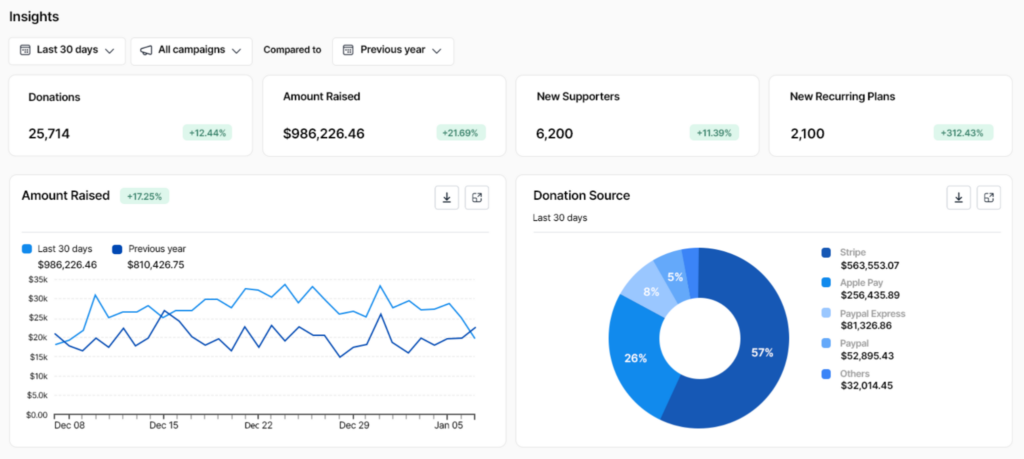
Donorbox is a fundraising platform built around online donations. Small nonprofits can create donation forms and pages, run crowdfunding and peer-to-peer campaigns, sell event tickets, and manage recurring gifts without needing a developer.
That lighter setup can work well for organizations that mainly need an easy way to collect donations online.
Donorbox also supports donor records, reporting, and repeat giving, so teams can manage more than the transaction itself as their fundraising grows.
Key features
- Recurring giving: Let supporters set up ongoing donations.
- QuickDonate: Makes it easier for returning donors to give again.
- Peer-to-peer fundraising: Let supporters create pages and fundraise for your organization.
- Crowdfunding: Build campaign pages around a specific goal or appeal.
- Donor management: Keep donor and gift records inside Donorbox for follow-up and reporting.
Donorbox has a 4.8 out of 5 rating across 625 Capterra reviews, including 4.8 for ease of use and 4.7 for customer service.
Trish M., a nonprofit president and executive director reviewing Donorbox on G2, said she could set it up quickly despite having very little technical experience.
Pricing
Donorbox’s Standard plan costs $0 per month. Most fundraising features carry a 2.95% platform fee, while Events, Memberships, and Peer-to-Peer can reach 3.95%, plus payment processing fees.
The Pro plan costs $150 per month and lowers platform fees to between 1.75% and 2%.
4. Fundraise Up
Best for: Teams that want to turn more website visitors into donors and grow recurring giving.
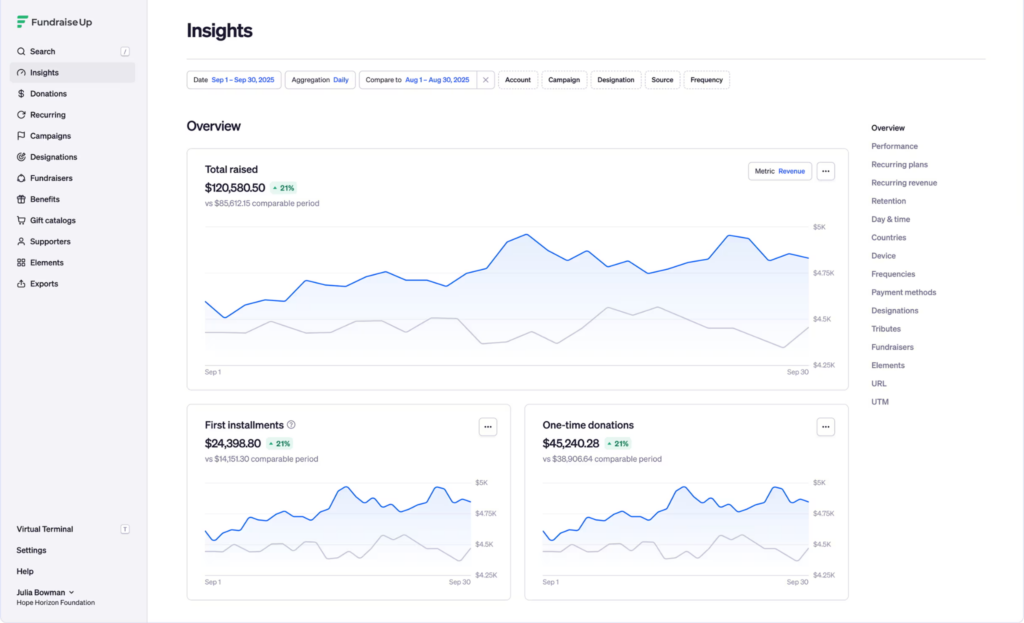
Fundraise Up takes a different approach from a traditional fundraising platform. It helps more website visitors complete a gift and encourages one-time donors to become recurring supporters.
The platform uses AI and machine learning to adjust suggested gift amounts, recurring giving prompts, and other parts of checkout based on donor behavior.
That can appeal to a small nonprofit that already has a website and donor database but wants to get more from its online fundraising traffic.
Fundraise Up also supports global giving, with more than 20 payment methods, 135+ currencies, and 23 languages.
Key features
- AI-powered checkout: Personalizes suggested donation amounts and gives prompts for each donor.
- Campaign pages: Build dedicated pages around appeals and fundraising goals.
- Donor Portal: Gives supporters a place to manage donations and recurring plans.
- Global payments: Accept cards, digital wallets, bank payments, crypto, and other payment methods.
- CRM integrations: Connect Fundraise Up with other systems so donor and gift data can flow into your existing database
Fundraise Up has 4.8 out of 5 across 93 Capterra reviews, with 4.9 for ease of use and customer service. Jared D., an executive director, praised how easy the platform was for both his team and donors.
Pricing
Fundraise Up uses performance-based pricing rather than a monthly subscription. There are no setup fees, subscription fees, or long-term contracts.
5. Neon One
Best for: Growing nonprofits looking to manage fundraising, donor data, and communications in one CRM.
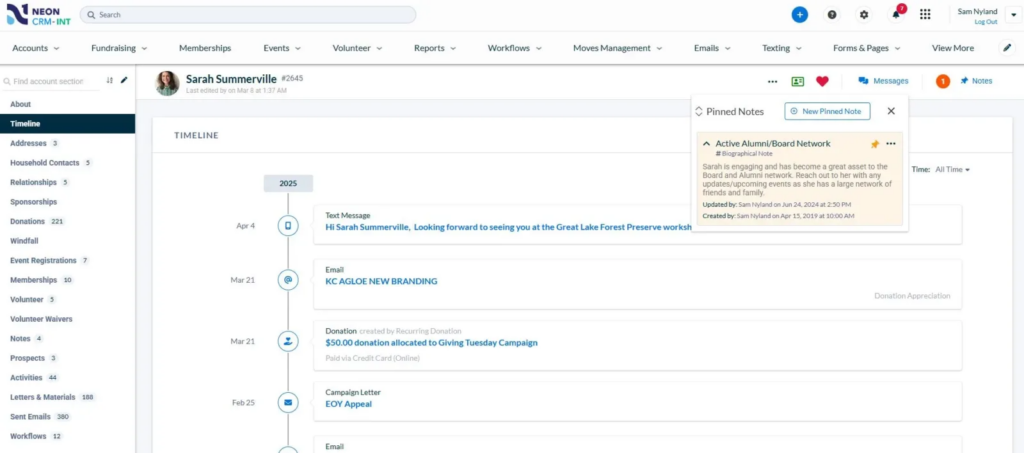
Neon One is great when spreadsheets and basic fundraising tools are starting to feel too limited. Its Neon CRM brings donor records, fundraising, email, reporting, grants, and automation into one system, with optional tools for events, memberships, and volunteers.
That gives a growing nonprofit more structure around donor data without forcing the team into a much heavier enterprise system.
Gifts, emails, campaign activity, and supporter history can all stay connected to the same record.
Key features
- Supporter profiles: Keep giving history, interactions, and other donor information together.
- Donation forms & campaigns: Accept one-time and recurring gifts and track fundraising activity.
- Email & text messaging: Segment supporters and send outreach from the CRM.
- Automated workflows: Set up welcome messages, renewal reminders, and other donor journeys.
- Grant management: Keep grant details, deadlines, and activity alongside other fundraising data.
Neon CRM gets a 4.3 out of 5 across 620 Capterra reviews, with 4.1 for ease of use and 4.3 for customer service. And a 4.2/5 across 443 G2 reviews.
Jordan M., a marketing manager at a small organization, valued being able to manage donations, memberships, volunteers, communications, and events in one place.
Pricing
Neon CRM pricing starts at $99 per month. Pricing is based on your nonprofit’s revenue rather than the number of donor records you store.
Events, memberships, and volunteer management are optional add-ons. Memberships and volunteer tools each add 10% of the CRM subscription fee, while Events adds 20%.
6. DonorPerfect
Best for: Fundraisers looking for a more structured donor database, stronger reporting, and room to build more complex fundraising processes over time.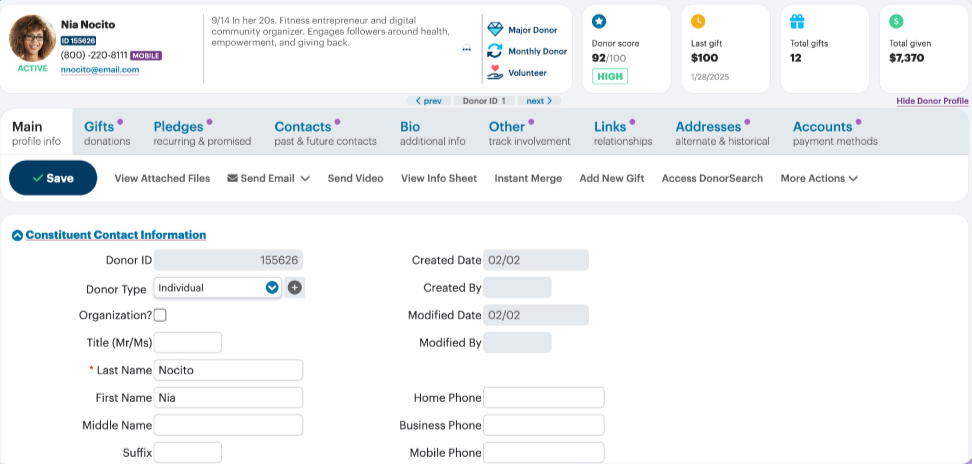
DonorPerfect gives teams one place to track donors, gifts, outreach, relationships, and fundraising activity over time.
Your team can segment donors by giving history or behavior, automate follow-up, track recurring gifts, and build reports from the same records used for day-to-day fundraising.
Online forms also feed donor and gift data back into the CRM, which can reduce manual entry.
Key features
- Donor profiles: Track giving history, relationships, communications, and other supporter data.
- Online donation forms: Collect one-time and recurring gifts with data synced back to DonorPerfect.
- Segmentation: Group supporters by giving history, recency, behavior, and other criteria.
- Automated workflows: Set reminders, tasks, receipts, and follow-up based on donor activity.
- Donor portals: Let supporters manage contact details, payment methods, and recurring giving.
Reviews tend to support DonorPerfect’s strength as a donor database. 4.5 out of 5 across 1,475 Capterra reviews, and 4.8 for customer service. Lisa D., a development director, valued having clearer donor histories and relationship data.
Pricing
DonorPerfect currently offers plans starting at $99 per month. The platform has Core, Plus, and Pro packages, with more advanced tools added as you move up.
Final pricing requires a custom quote based on your organization’s needs.
7. Qgiv
Best for: Organizations that rely on events, auctions, peer-to-peer campaigns, and other hands-on fundraising formats.
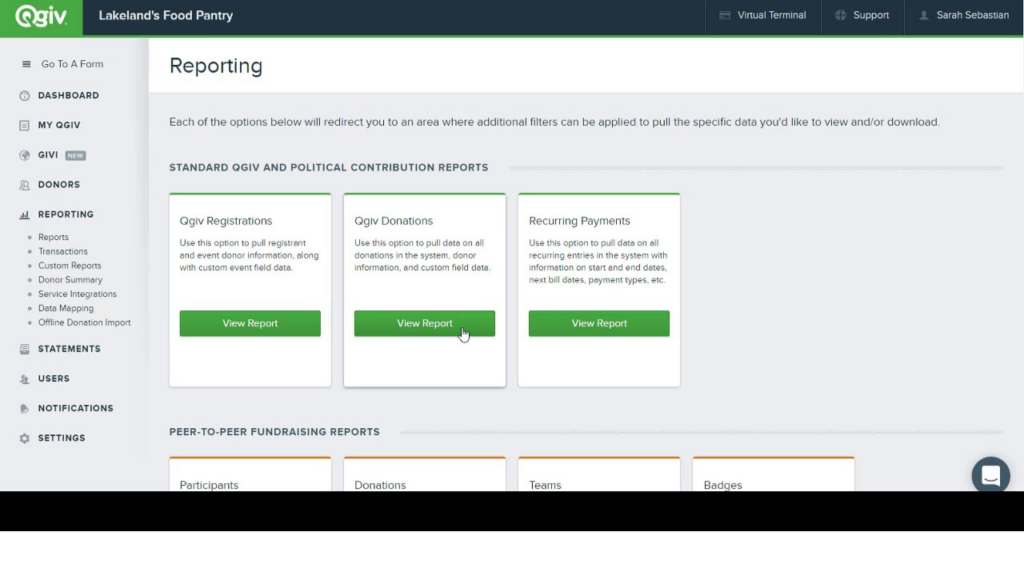
Qgiv, now called Bloomerang Fundraising, is for nonprofits that need more than a basic donation form. It combines online giving with event registration, auctions, peer-to-peer campaigns, and text fundraising in one system.
That makes it a useful option if events are a big part of how you raise money.
You can manage registration, ticketing, bidding, campaign pages, and donor payments without stitching together several event tools.
Key features
- Donation forms: Build branded forms for one-time and recurring gifts.
- Auctions: Run mobile and web bidding, alerts, checkout, and fund-a-need appeals.
- Peer-to-peer fundraising: Give individuals and teams their own fundraising pages.
- Text fundraising: Accept text donations and send scheduled messages.
- Reporting: Track campaign, event, and fundraising performance from built-in dashboards.
Bloomerang Fundraising, formerly Qgiv, holds 4.7/5 across 276 G2 reviews, while Capterra rates it 4.6/5 across 61 reviews. Lauren F., a philanthropy coordinator, appreciated how simple the system was to set up and use.
Pricing
Bloomerang Fundraising starts at $40 per month. However, it must be purchased as part of a bundle with Bloomerang CRM, which starts at $125 per month. So the final cost will depend on the package your nonprofit chooses.
How Get Fully Funded fits alongside your fundraising software
All of the fundraising tools we’ve covered here can save you a lot of time. It can collect donations, keep donor records in order, and help you see what is working.
What it cannot do is build the fundraising plan for you. You still need to know who to reach out to, what to say, when to ask, and how to keep the relationship going after someone gives.
That part comes down to skill, confidence, and a clear strategy.
That is where Get Fully Funded comes in. Its coaching, courses, and community are there to help you strengthen the part software cannot handle for you. Whether that’s communicating with donors more clearly, or simply feeling more confident about asking for support.
The best setup is really a mix of both.
Use the software to handle the systems and admin. Use the right fundraising skills to build the relationships and strategy that move your mission forward.
Want a clearer plan for finding, asking, and keeping donors?
Fundraising Software FAQs
Can I switch fundraising software without losing donor data?
Yes, in most cases. Many platforms let you export donor records, gift history, and contact data as CSV files, then import them into a new system.
The only challenge can be with recurring donations, stored payment details, and custom fields.
Check migration options before you commit to a switch.
Does fundraising software send tax receipts automatically?
Many platforms can send donation receipts as soon as a gift is made. Some also let you customize receipt language or resend receipts later.
Your nonprofit is still responsible for making sure the receipt includes the right information for your location and the type of donation received.
Can fundraising software connect with accounting tools like QuickBooks?
Often, yes. Some platforms connect directly with QuickBooks or other accounting software, while others use tools like Zapier or manual exports.
A direct integration can save time, but it is worth checking what actually syncs, such as donor names, payment details, campaign codes, and transaction fees.
What happens to recurring donations if I change fundraising platforms?
Recurring gifts do not always move automatically. In some cases, you can migrate active recurring donations. In others, donors may need to enter their payment details again.
Ask the new provider how recurring gifts are handled before you switch, since losing monthly donors can create avoidable revenue gaps.